One-person pole fielding.
The Macrilon Field App puts pole fielding on a phone. One person photographs each pole, with the height stick in the whole-pole photo. Macrilon calculates the heights from that photo and files everything under the job and the pole.
- 1person per crew
- Calculatedheights from the stick photo; your reviewer confirms each one
- Stickin the whole-pole photo, so Macrilon can calculate heights
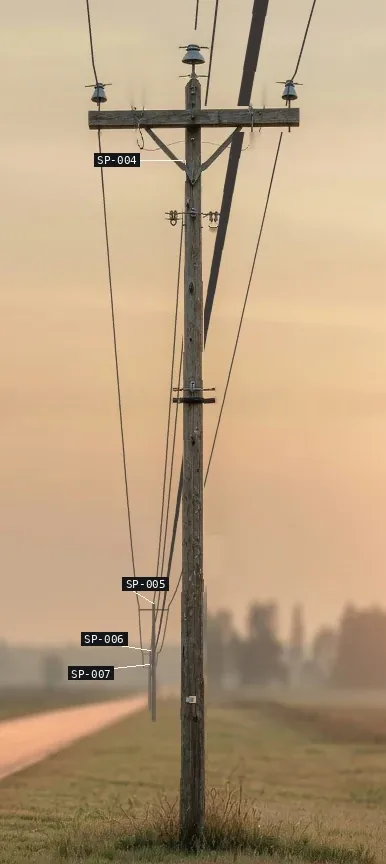 Top 29'-0"Primary 27'-7"Neutral 23'-11"Comm 17'-3"Ground
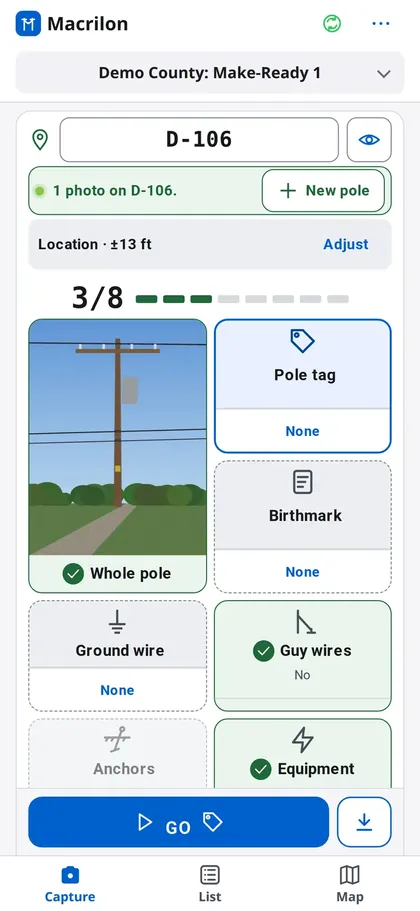
The Field App at a glance.
What it does and who uses it, in one place.
| Who it is for | Crews fielding poles for attachment applications and pole loading. |
|---|---|
| Crew | One person per crew with a phone and the height stick: no second person holding a tape, and no laser, rangefinder or tripod. |
| What one person does | Picks the job, photographs each pole with the height stick in the whole-pole photo, and syncs. |
| What is recorded | Pole ID, photos and a location check at the pole, filed under the job and the pole; Macrilon adds the heights it can calculate from the stick photo. |
| Heights | Calculated by Macrilon from whole-pole photos that include the height stick, each labelled with its basis, and confirmed by your reviewer. A July 2026 test of the calculation is described under How heights work. |
| Without a signal | Photos taken with no signal wait on the phone and upload when you are back in signal, while the app is open and signed in. |
| Cost | Your administrator sets up the sign-ins. |
| What it feeds | Pole loading works from the same pole record, together with your loading inputs. |
Use cases.
- Pole Application Fielding
- Field the poles for an attachment application: pole IDs, photos and heights calculated from the stick photo, for ILECs, ISPs and other attachers.
- FTTX Routing
- Field the poles along a planned fiber route. Fiber design is invite-only: a Macrilon engineer draws or checks every route.
- MRE/PLA
- Field the poles for Pole Loading Analysis, which works from the same pole record together with your loading inputs. Make-ready engineering is arranged with our staff.
How heights work.
Every height Macrilon calculates is labelled "Calculated by Macrilon", with how it was worked out, and your reviewer confirms each one.
In a July 2026 test on 695 attachment points from a survey crew's stick photos, heights calculated from the pole's known height had a median error of 1.8 in against the crew's measurements (9 in 10 within 5.3 in). That test did not use Field App photos. The higher a wire sits above the stick, the more it needs a field check.
- Where heights come fromWhole-pole photos that include the height stick
- Who confirms each heightYour reviewer
Heights Macrilon calculates are a starting point that your reviewer checks. If the stick cannot be read in the photo, Macrilon asks for a recapture. Heights are not worked out without the stick, and Macrilon does not measure clearances between poles from photos. The labeling and measuring models are Macrilon's own.
Built for a one-person crew.
No second person holding a tape: one person carries the phone and the height stick. The crew follows the job on the phone, and the office sees each pole once its photos have uploaded.
- Pick the jobThe job you pick files every photo under it.
- Photograph the poleEach shot is filed under the job and the pole you picked, with a location check at the pole.
- Photograph the whole poleKeep the height stick in the photo. Macrilon calculates the heights from it.
- SyncPhotos taken with no signal wait on the phone and upload when you're back in signal, while the app is open and signed in.
Follow your organization's site-safety and staffing requirements.
Where the pole record goes next.
The poles your crew fields are what Pole Loading Analysis works from, together with your loading inputs. Make-ready engineering is arranged with our staff. OSP Design and MRE/PLA.
Get the Field App.
On the US App Store and Google Play, for iPhone, iPad and Android. It needs a Macrilon account set up by your administrator; there is no sign-up inside the app.